Website speed, user experience, and search engine rankings are closely connected. One of the most overlooked but powerful SEO techniques is image compression.
What Is Image Compression?
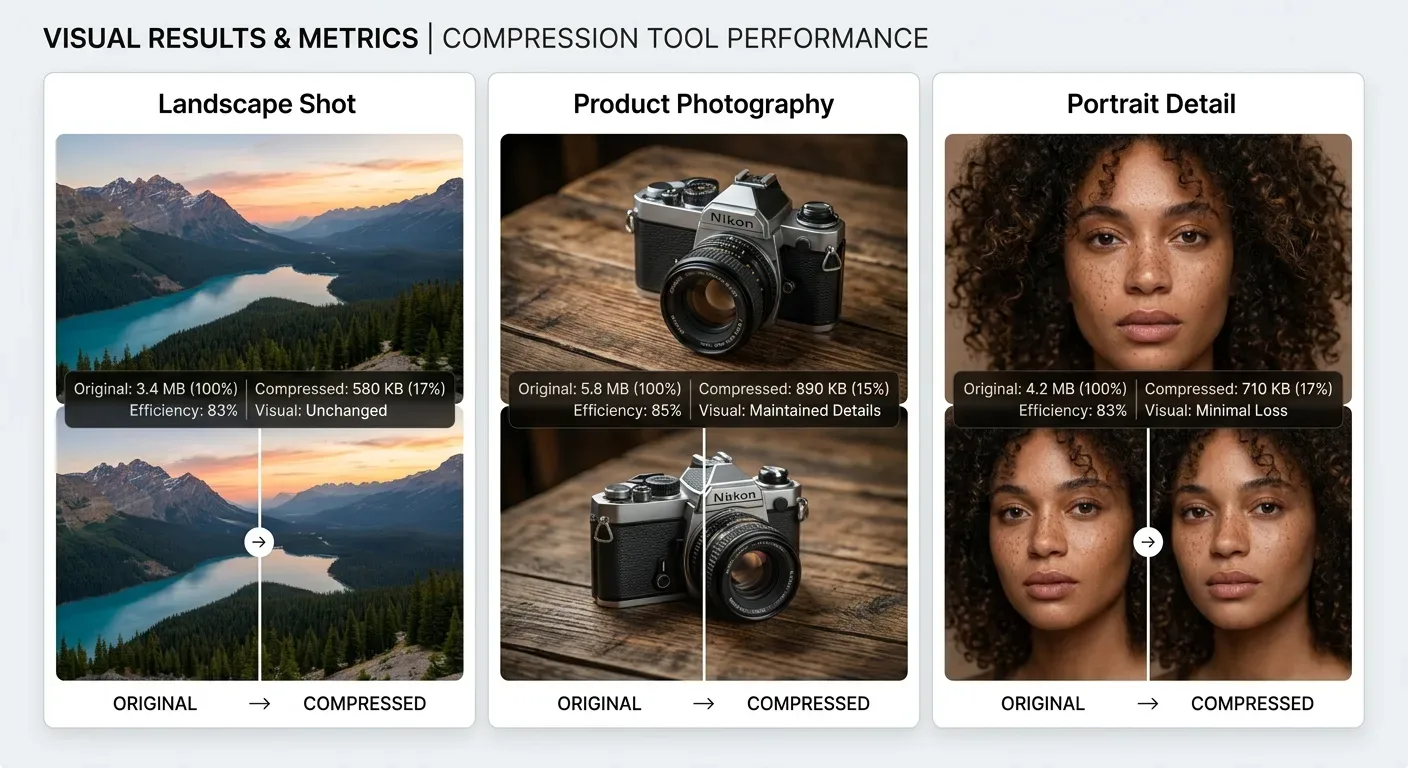
Image compression is the process of reducing an image’s file size without significantly affecting visual quality. This improves website performance and loading speed.
Why Image Compression Matters for SEO
Google prioritizes fast, user-friendly websites. Large image files slow down pages and negatively impact rankings.
1. Faster Page Speed (Major Ranking Factor)
Page speed is a confirmed Google ranking factor. Compressed images load faster, reduce server load, and improve user experience.
2. Improved Core Web Vitals
Image optimization directly impacts Core Web Vitals such as LCP, CLS, and INP. Faster image loading improves these metrics significantly.
3. Better Mobile SEO Performance
Google uses mobile-first indexing. Compressed images load quickly on mobile devices, improving rankings and reducing bounce rate.
4. Lower Bounce Rate & Higher Engagement
Slow pages drive users away. Optimized images help visitors stay longer, increasing engagement and SEO performance.
5. Improved Crawl Budget
Smaller pages allow search engines to crawl more content efficiently, which improves indexing and visibility.
6. Better Image Search Rankings
Optimized images rank better in Google Images when combined with proper file names, ALT text, and compression.
Best Image Formats for SEO
- JPG / JPEG – Best for photos
- PNG – Logos and transparency
- WebP – Best overall format for SEO
Does Image Compression Reduce Quality?
When done correctly, image compression does not noticeably reduce quality. Modern tools balance size reduction with visual clarity.
Final Verdict: Image Compression & SEO
Image compression is essential for modern SEO. Faster loading times, better Core Web Vitals, and improved user experience lead to higher rankings.
Best Online Image Compression Tools to Optimize Images for the Web
Website speed plays a critical role in search engine rankings and user experience. Using reliable online image compression tools helps reduce image size without sacrificing quality, making your site faster and more efficient.
Whether you are a blogger, designer, or website owner, choosing the right image compression tool is essential for improving performance and SEO.
What Is Image Compression and Why It Matters
Image compression is the process of reducing file size while preserving visual clarity. A good photo compression tool allows you to load pages faster, save bandwidth, and improve user engagement.
When you compress images for web, your website benefits from better Core Web Vitals scores and improved visibility in search results.
Online Image Compression Tools vs Software
Online Image Compression Tools
An image compression online tool works directly in your browser. You don’t need to install any image compression software, making it ideal for quick and secure optimization.
- No installation required
- Works on all devices
- Fast and easy to use
- Ideal for quick image optimization
A free online image compression tool is perfect for users who want instant results without technical knowledge.
Image Compression Software
Desktop-based photo compression software offers advanced features such as batch processing and offline access. Many users also rely on free image compression software for basic needs.
Image Compression in Photoshop
Designers often use image compression in Photoshop for precise control over image quality. With options like “Save for Web,” photoshop image compression allows you to choose file size, format, and resolution manually.
While Photoshop is powerful, an image compression software online solution is usually faster for everyday use.
Best Image Compression Tools Available Online
There are many best image compression tools available today. Popular solutions include browser-based tools and well-known platforms like the ShortPixel image compression tool.
These tools allow you to compress image for website use while maintaining high visual quality.
Free Image Compression Tools for Web Optimization
A reliable free image compression tool helps reduce file size efficiently. Using a compression image tool, you can optimize JPG, PNG, and WebP images with just a few clicks.
Many image compression websites support bulk uploads and smart compression, making them ideal for web projects.
Google Image Compression and SEO Benefits
Google image compression best practices focus on fast loading, mobile responsiveness, and optimized file formats.
Using proper image compression web techniques helps improve page speed scores and boosts rankings in Google Image Search.
Best Image Compression Format for the Web
Choosing the best image compression format is essential:
- JPEG – Best for photographs
- PNG – Best for transparency
- WebP – Best compression image format for modern websites
If you want the best compression image format, WebP provides excellent quality with smaller file sizes.
How to Compress Images for Web Properly
To compress image for web effectively:
- Select a trusted compress image tool
- Upload your original image
- Apply smart compression
- Download the optimized file
- Upload it to your website
This process ensures smooth image compress web performance and faster page loading.
Final Thoughts
Whether you use an online photo compression tool, desktop image compression software, or a modern image compression website, optimizing images is essential for success online.
The right compress image tools help you improve website speed, enhance SEO, and deliver a better user experience through effective image optimize web strategies.
Compress Images Easily
Use IMGCompressor.shop to compress images online for free and improve your website speed and SEO instantly.